
HW 11
Problem 1
Read the posted notes for the terminal and vim carefully. Type along with every command you see (or equivalent in terms of files. That is, practice using the commands. Be very careful with rm commands. State if you did this. (When I say every command, I really mean I want you to practice by typing things out, and exploring in good faith, not that you have to literally type everything you see.) State if you did this.
Problem 2
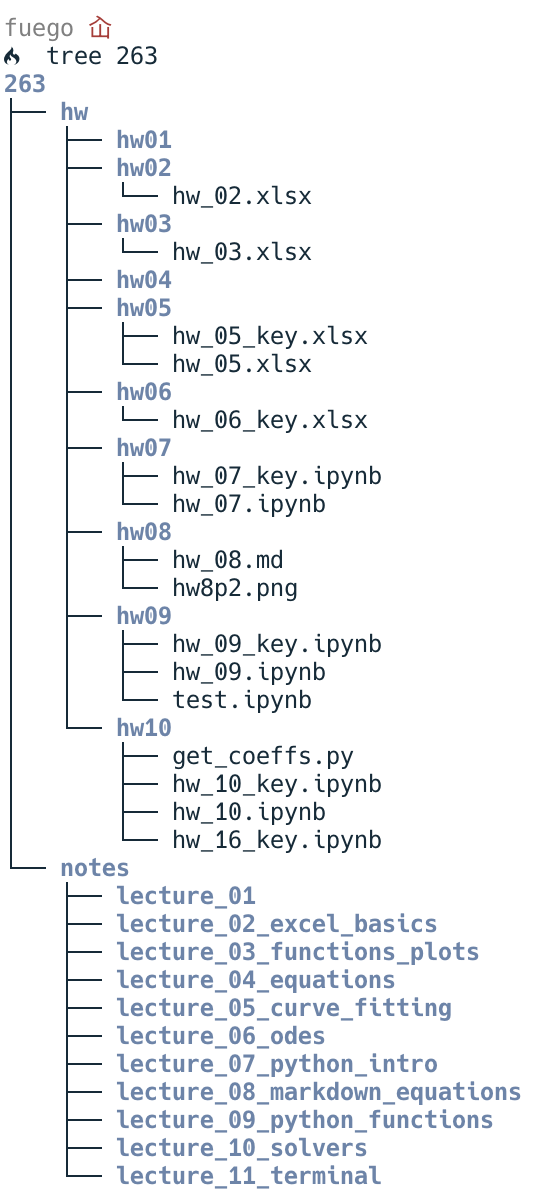
Create a file structure for this course. Something like shown below, but you can use your own filenames (which should not include spaces). You don’t need every file present, but include the files you do have. Use the tree program to make a picture of your folder structure.
- On mac, you should be able to install
treeusing by typingconda install conda-forge::treeon the command line. - On Windows type
sudo apt updateand then when that’s done typesudo apt install treefrom the Ubuntu terminal. Then navigate to the folder above 263 and typetree 263. Then take a screenshot of the image and include it in a markdown cell of a Jupyter notebook for this problem. The image will be included in the html when you export the ipynb file to an html file for uploading your assignment.
Note, from an Ubuntu terminal, you can find your usual files by going to /mnt/c/Users/yourUserName/wherever. On Mac, there is only one file system and your files are in /Users/yourUserName
If you don’t want to change your existing files and folders, then make copies in another space. But use the terminal.
Problem 3
Download and open this file in vim. Try out all the command and motions in the vim notes move around and edit the file. Look up something new in vim and describe what it is and how to use it. If you like it and want to practice, you can install the vim plugins for VScode.
State if you did this along with describing the new thing you learned.